


Agent Document Processing Platform (AI + OCR)
zero-shot parsing of complex layouts, handwriting, stamps, and multilingual content, transforming unstructured documents into business insights with multiplied efficiency.
Innocorn Technology Limited
Summary
This Agent Document Processing Platform is a next-generation OCR solution designed for complex enterprise document scenarios. It goes beyond text recognition by understanding document structure, layout, meaning, and business context. With support for multi-language and multi-format files, it can process invoices, contracts, purchase orders, receipts, certificates, and other business documents without requiring heavy training, annotation, or template setup. Users can upload documents and use natural language to define extraction tasks, while the system automatically parses, classifies, extracts, and integrates data into downstream business systems. It is designed for both efficiency and scalability, supporting 24/7 processing, zero-shot learning, and continuous self-improvement through use. It also connects with ERP, CRM, BI, and other enterprise systems through APIs and other integration methods. For enterprises that manage large volumes of documents, it reduces manual work, shortens turnaround time, improves data quality, and helps unlock the value hidden in unstructured information.
Applicable Industry
Solution Category
Highlights
Understands complex document structure, including tables, handwriting, stamps, watermarks, and cross-page content.
Supports 100+ languages and multi-format, mixed-language business documents.
Requires no large training dataset, with zero-shot and one-sample start capability.
Integrates smoothly with enterprise systems through APIs, MCP, and other interfaces.
Delivers faster processing, higher accuracy, and lower manual workload for document-heavy workflows.
OCR Leaflet
Service Packages and Offerings
HK$500/Month
HK$1,500/Month
獨家優惠
Learn more
Service packages and offerings are subject to dedicated terms and conditions, please contact the service providers directly for further details
Details
1. Core Technical Architecture
- Model Layer: Powered by a dual-engine architecture combining LLM (Large Language Model) and VLM (Visual Large Model), enabling both semantic understanding and visual localization to truly comprehend document logic and business attributes.
- Capability Layer: Provides atomic capabilities including document classification, element extraction, table reconstruction, handwriting recognition, stamp extraction, and risk insights.
- Application Layer: Covers 100+ business document types including orders, invoices, contracts, bills of lading, customs declarations, supporting finance, supply chain, legal, and other departmental scenarios.
2. Key Functional Features
- Natural Language Extraction: Users define extraction requirements through plain language descriptions (e.g., "extract the compensation ceiling promised by Party A"), with the system accurately locating and extracting information without technical expertise.
- Intelligent Assistance & Validation: The system automatically analyzes samples, recommends field descriptions and extraction rules, supports fine-tuning of semantic rules, and enables validation through batch testing.
- End-to-End Process Automation: From document receipt (email, WeChat, fax, etc.), parsing, classification, and information extraction to data output and system integration, enabling 24/7 unmanned processing.
3. Typical Use Cases
- Manufacturing: Processes multinational purchase orders, supporting 40+ languages and 4,000+ template parsers, saving CNY 3.2 million in annual labor costs with 50% reduction in per-order processing time.
- Contract Management: Automatically extracts payment milestones, penalty clauses, and other critical information, pushing payment reminders to ERP systems 7 days in advance to mitigate contract execution risks.
- Financial Shared Services: Automates processing of invoices, reimbursement forms, payment vouchers, significantly improving audit efficiency and compliance.
Example:
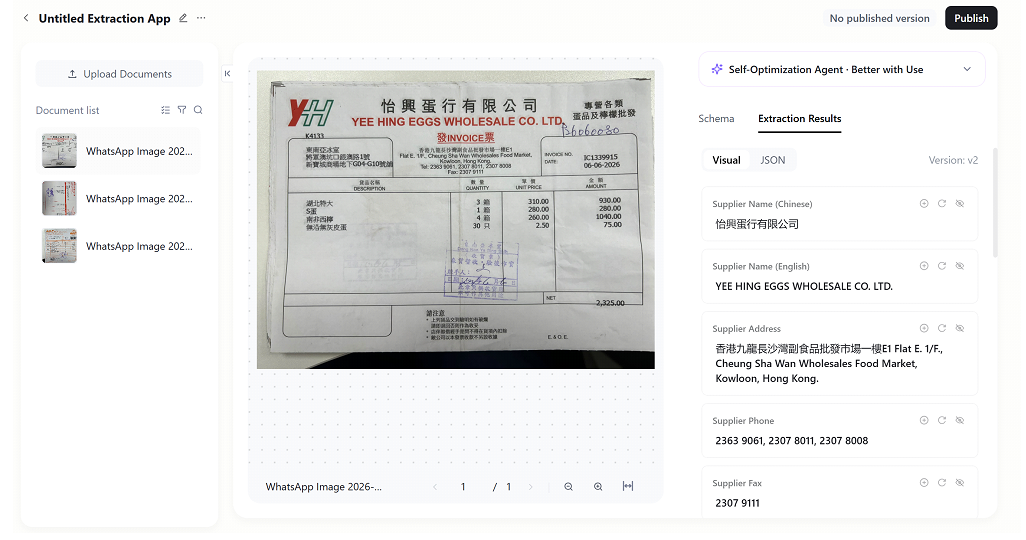
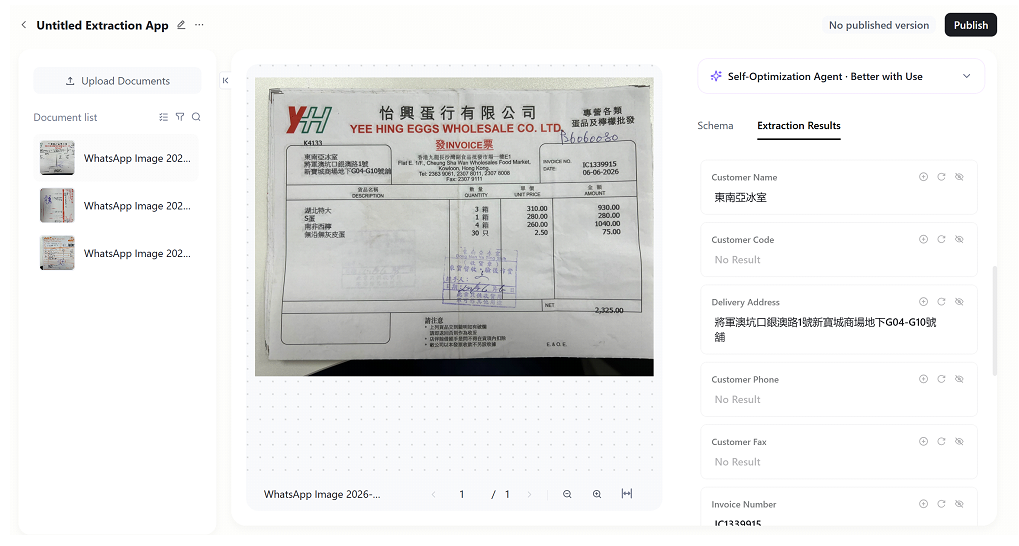
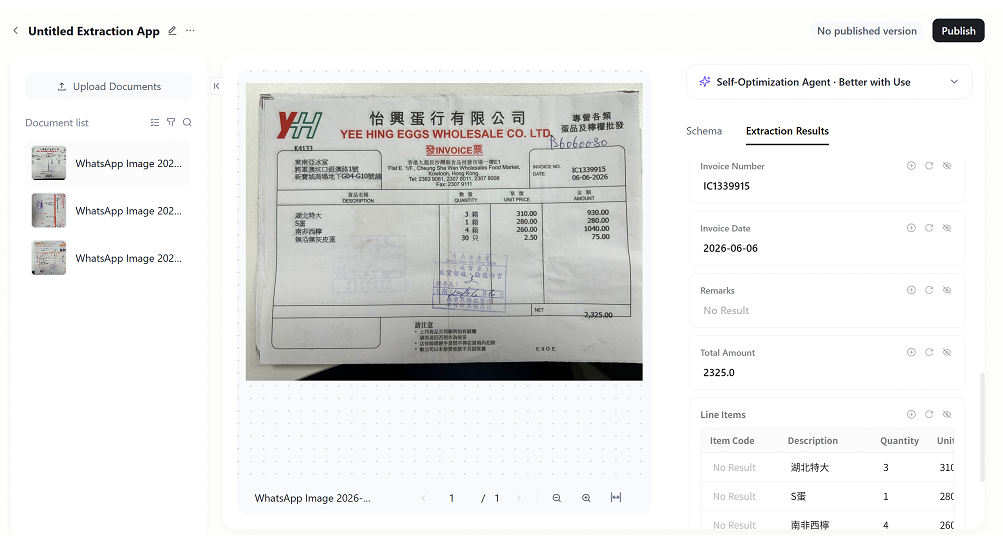
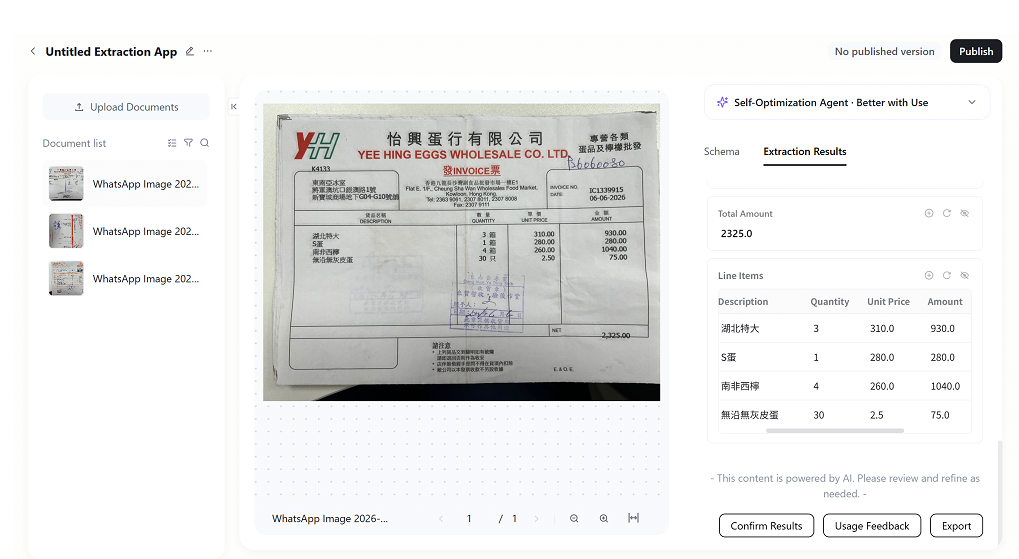
After entering the custom application, the page is divided into three areas:
- Left File List: Displays all uploaded files; you can switch between different files for viewing.
- Middle Preview Area: Previews the original files, making it easy to set extraction rules by comparing them.
- Right Settings Area:
- You can freely add or delete extraction fields, write unique prompts for each field, and specify extraction rules.
- After setting up, click "Test Extraction" to test the extraction effect.
- Once the effect is correct, click "Save" to save. Publish in the upper right corner to officially use it.
- It also supports self-optimizing agents; as errors are corrected during use, the recognition effect will continue to improve.